BetaiPhone · Android · Mac
Get out of debt.
Stay out.
The last money app you’ll need.
Pursewright takes what you earn, owe and pay, in AED, USD, LKR or any other currency, and shows you the fastest way out. Then it keeps you there.
Any currency · No bank logins · Your numbers stay on your phone
- Free to spend
- Stream Bar
- Freedom Date
- Cards as a wallet
- Catch-up plan
- Should I buy this?
- Any currency
- Commitments
- Subscriptions
- Set aside
- Log a spend in four seconds
- No bank logins
01 · what the banks get
Paying only the least is a trap. Here’s how deep it goes.
That’s 12 years and 74,217 AED.
An example: five cards owing about 59,000 AED in total, with the salary and costs below. Your numbers will be different.
See the example’s numbers
- Monthly income
- 14,938AED
- Fixed monthly costs
- 6,695AED
- Loan instalments
- 1,850AED
- Kept aside each month
- 747AED
- Card A · costs you a year 419 per 1,000
- 18,500AED
- Card B · costs you a year 390 per 1,000
- 9,200AED
- Card C · costs you a year 432 per 1,000
- 3,400AED
- Card D · costs you a year 360 per 1,000
- 27,000AED
- Card E · costs you a year 444 per 1,000
- 1,150AED
- Least payment: 5% of what you owe, at least 100 AED.
This shows the example’s numbers. It isn’t financial advice.
02 · how it works
Three steps, in plain words.
- 1
Answer ten plain questions.
What comes in, what’s held where, what you owe and what you pay. Rough numbers are fine. No forms, no jargon.
- What should we call you?
- Which currency do you live in?
- What comes in each month?
- Which cards do you carry?
- 2
See where your money really goes.
Rent and groceries come first. Then the least each card needs, then what you set aside for the year. Whatever’s left is free to spend.
- 3
Follow one clear plan.
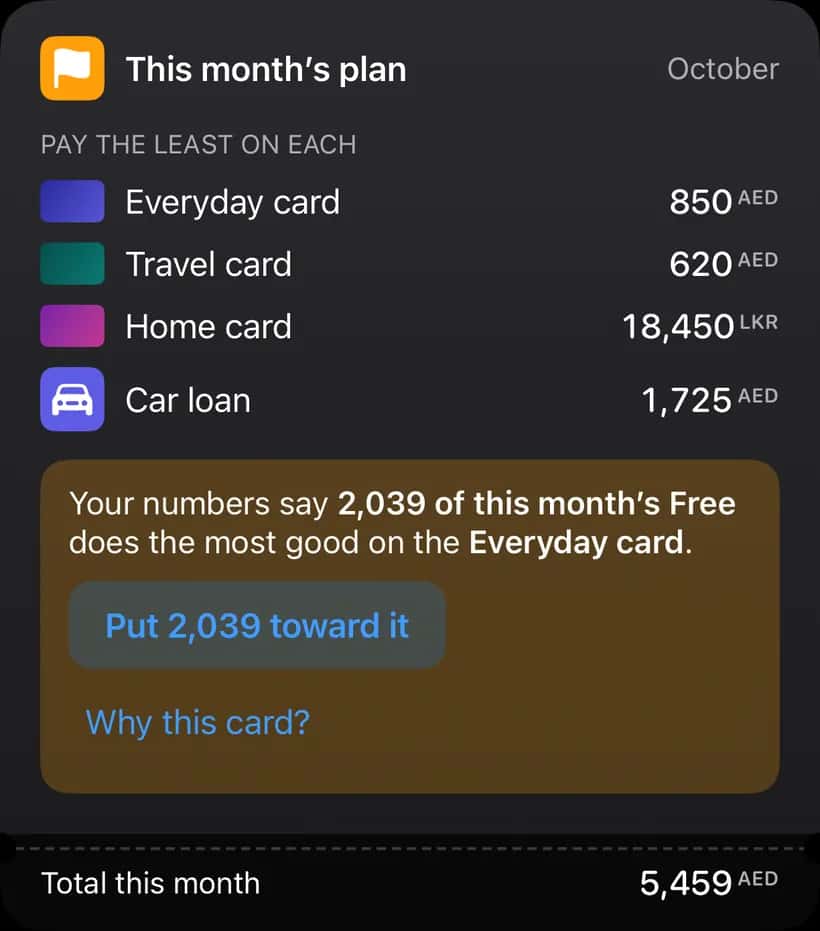
Pursewright picks the card where extra money does the most good this month, and tells you why, in one line.
Put the extra hereEmirates NBDEveryday card
03 · inside the app
The app, as it is today.
Real screens from the iPhone build, running the sample month. Every figure on them comes from the same engine as this page.
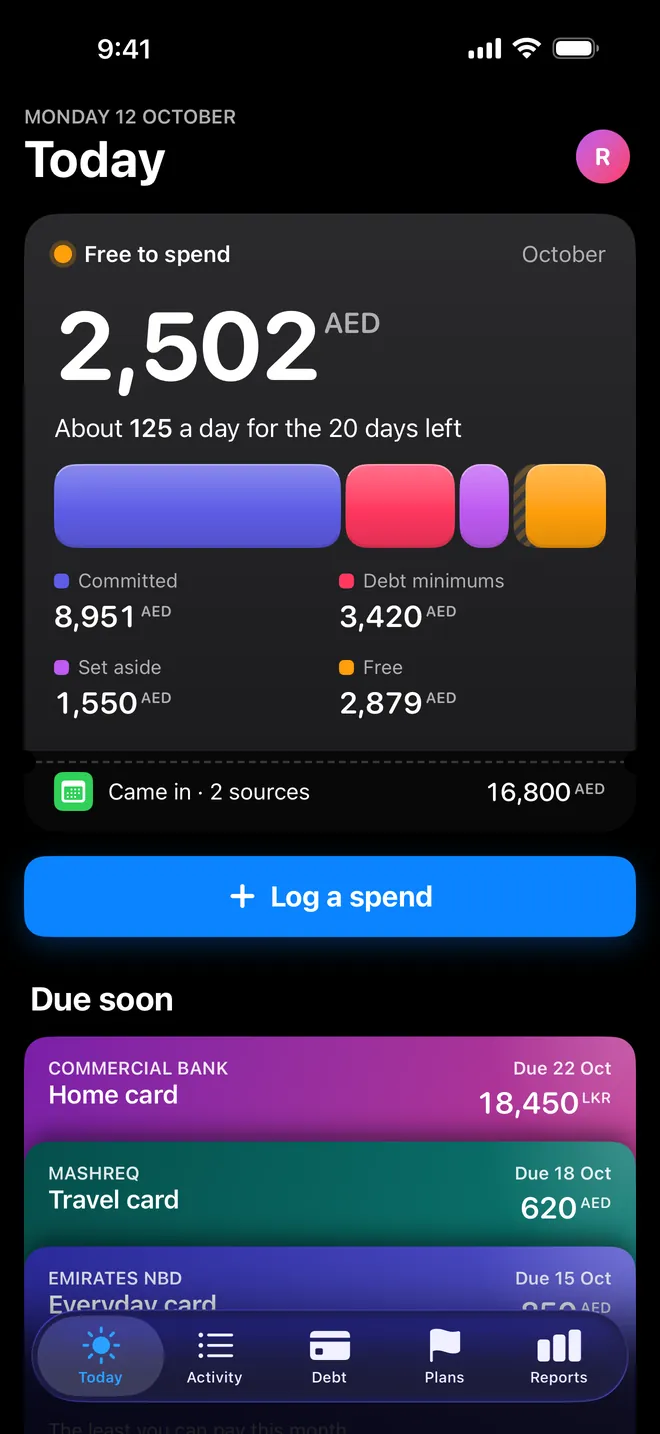
Today: what’s free, and where the month goes.
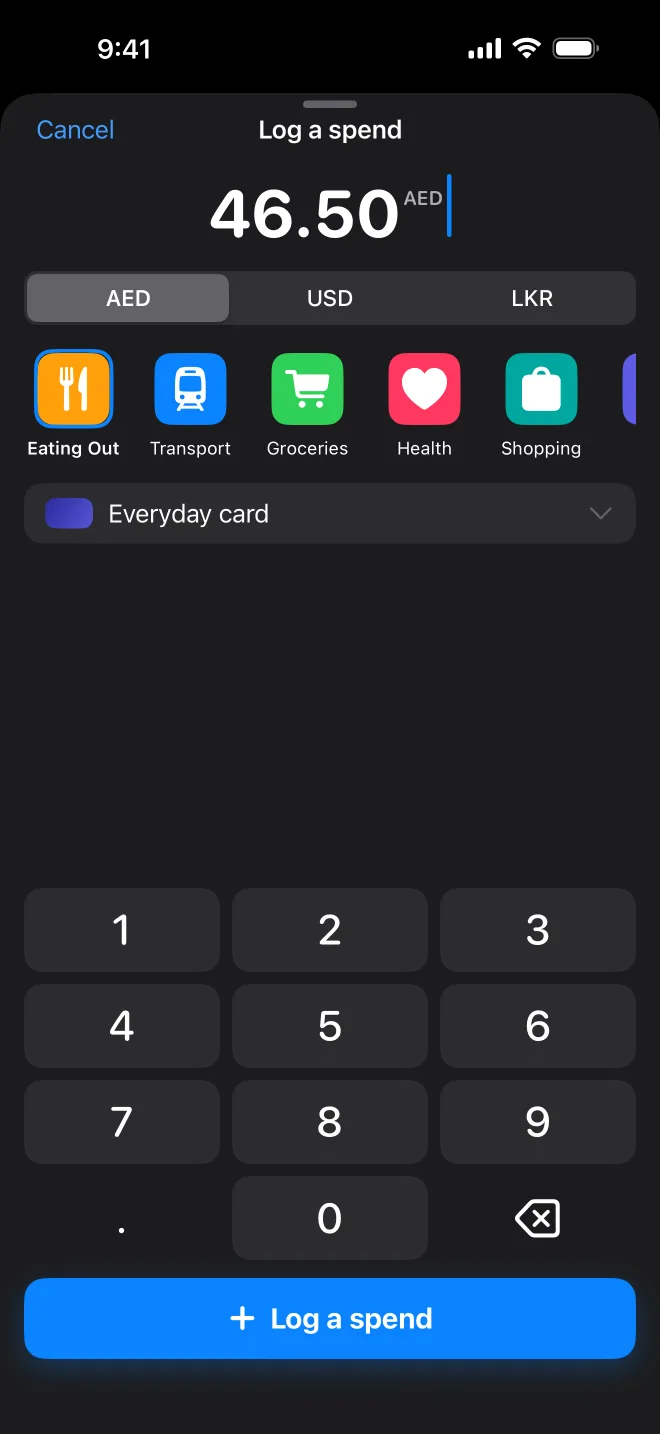
Log a spend in under four seconds.
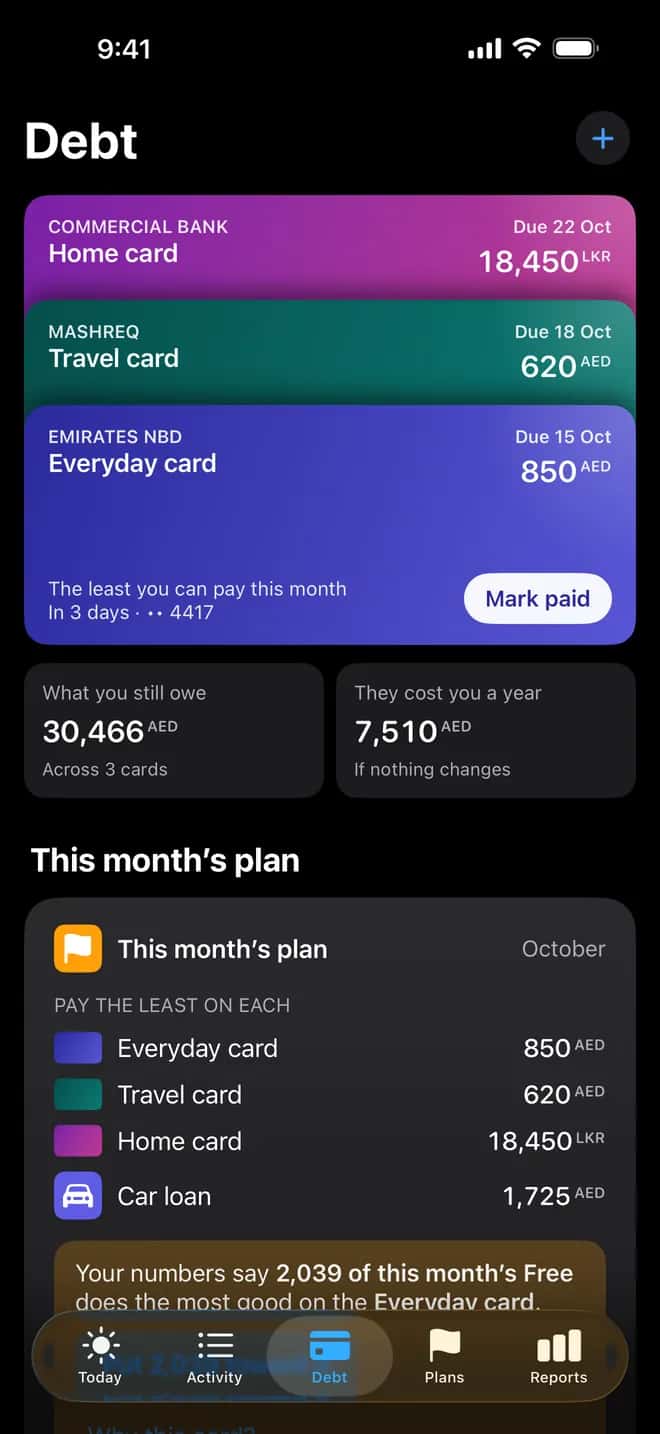
Your cards, and what they cost.
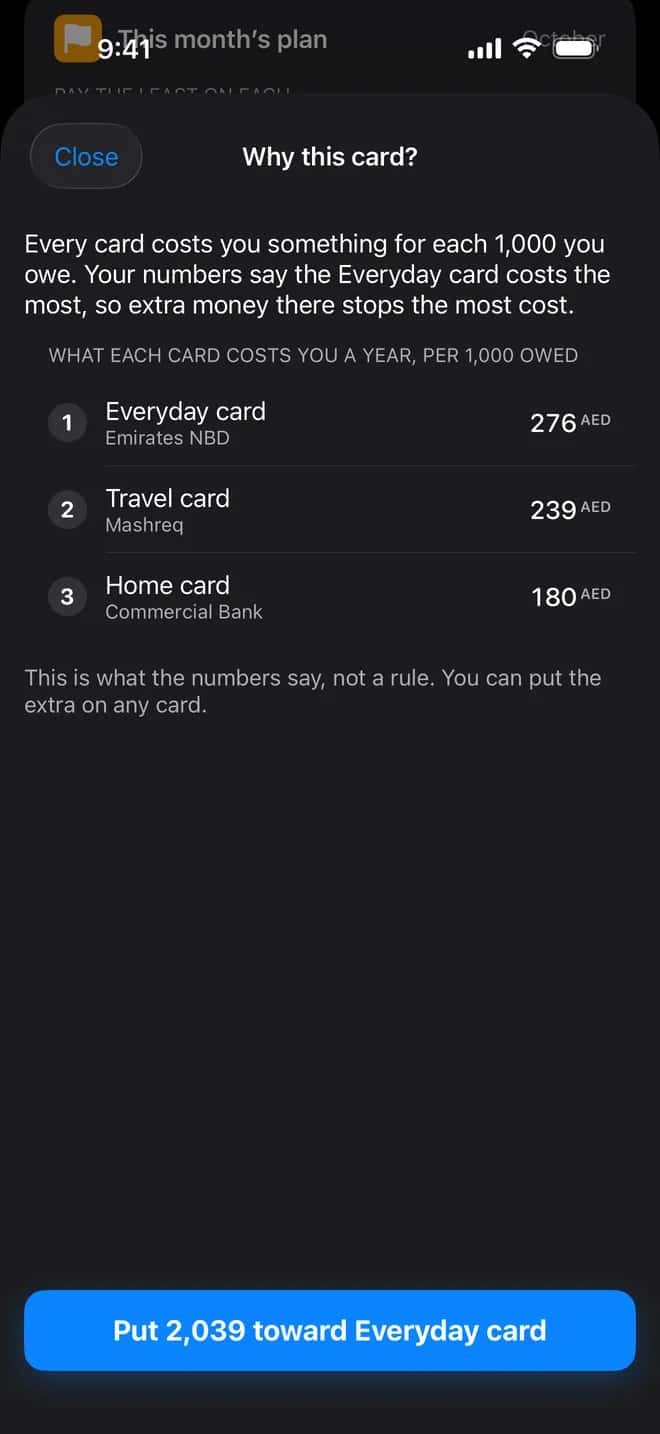
Why this card, in one line.
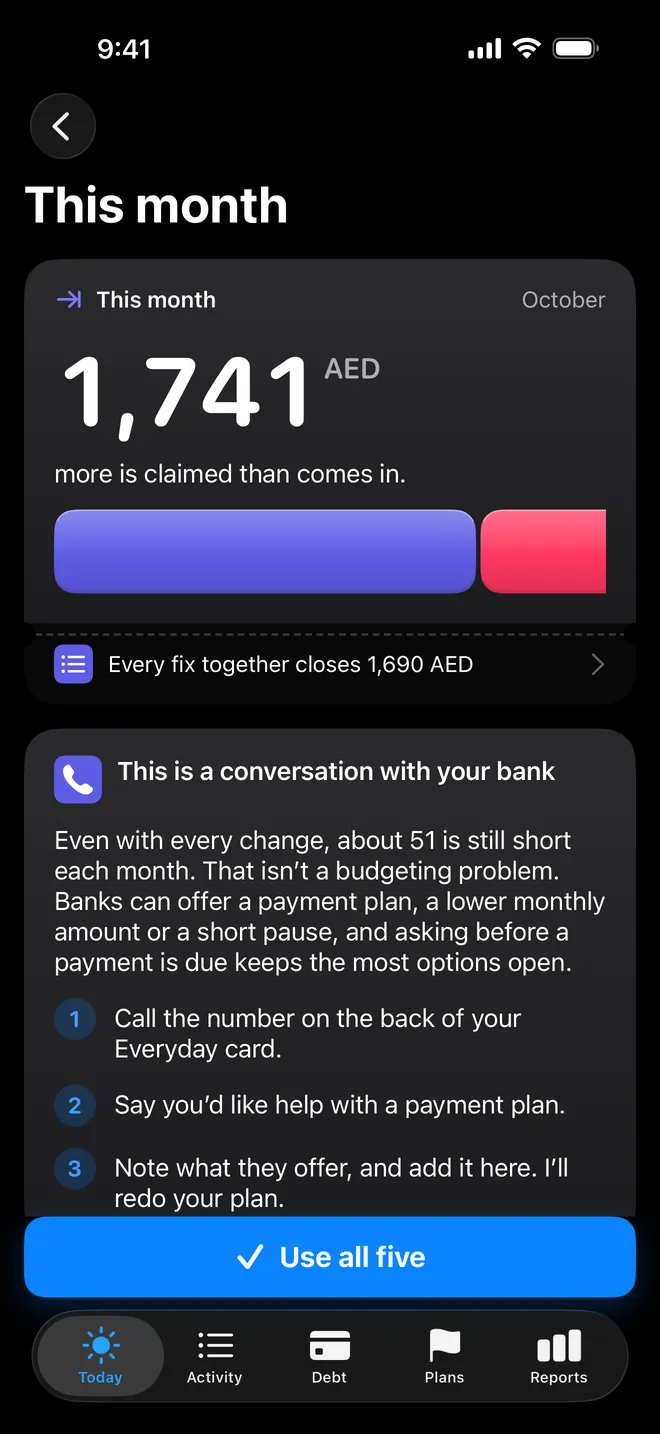
A hard month, said plainly.
04 · free to spend
Know what’s actually yours.
One bar for the whole month. Every claim on your income in order, and what’s left is yours to spend, with a daily figure you can live by.
Your numbers never leave this page.
05 · your cards
Every card, one clear order.
Each card drawn as itself, with what it really costs you a year. Your plan lifts the one where extra money clears debt fastest.
06 · freedom date
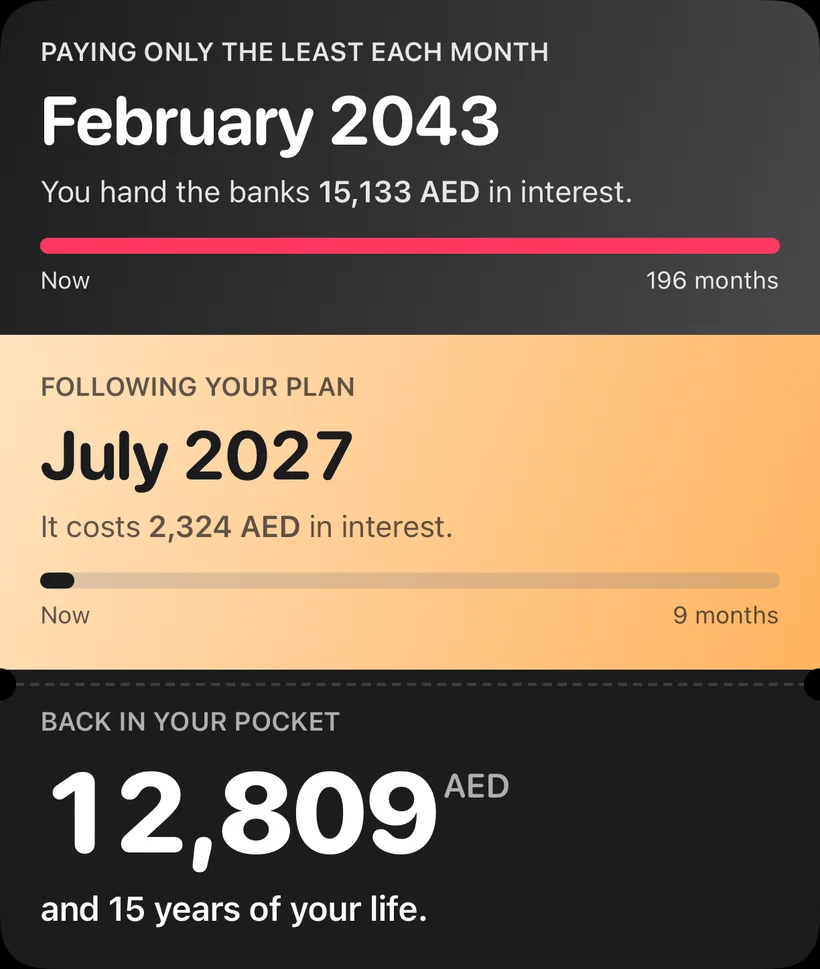
Find your Freedom Date.
Enter up to five cards and your month. You get your own comparison: paying only the least against following a plan, with the dates and what each costs.
Your numbers never leave this page. This shows your own numbers. It isn’t financial advice.
07 · catching up
Behind? There’s a way back.
Three plain numbers and a date you’ll be back on track. Slide the extra you can find each month and watch the date move.
An example: a personal loan behind by 3 payments, 1,850 AED a month.
Back on track by May 2027, in 7 months
Being behind costs 392 AED on the way back
Your numbers never leave this page. This shows your own numbers. It isn’t financial advice.
08 · should I buy this?
See what it really costs.
Type a price. See what it costs on a card once the extra months are counted, how long saving for it takes, and what putting it toward your plan would do instead.
Worked on the same example as above: five cards, the plan already running.
Your numbers never leave this page. This shows your own numbers. It isn’t financial advice.
09 · any currency
Earn in one. Spend in many.
Paid in dirhams, sending money home in rupees, a freelance invoice in dollars. Every amount keeps its own currency, with your home currency beside it.
10 · commitments
Small spends add up. We’ll tell you early.
Set the metro, the school run or lunch as a commitment. Pursewright watches the pace and tells you while you’re still deciding, not at the end of the month.
At this pace the money covers 10 more trips, for the 13 working days left.
11 · subscriptions
Find what you forgot you pay for.
Twenty-five a month doesn’t sound like much. Three hundred a year does. Every subscription shows both, and the ones you haven’t used get a quiet flag.
- Netflix39.00AEDa month
- Shahid VIPNot used in 3 months29.99AEDa month
- iCloud+11.99AEDa month
Pursewright can’t cancel for you, but it gives you the direct link and the steps.
12 · the hard months
Even the hard months have a plan.
When more is claimed than came in, the bar runs past its edge. Then you get a short list of what would close the gap, largest first.
13 · everything else
And everything else a money app should do.
- IncomeSalary, freelance, in whichever currencies you’re paid in.
- LoansWhat’s left to pay and when it ends.
- BudgetsPer category, weekly or monthly.
- Emergency fundA target that moves with your costs.
- Net worthThe line climbing month by month.
- Cash-flow calendarThe days between pay and due dates.
- ReportsWhere it went, and what changed.
- Month in reviewYour month, in one screen.
- Money sent homeSent, received and what the transfer cost.
- Instalment plansTabby, Tamara and the rest, counted as debt.
- Mac appThe monthly sit-down, on a big screen.
14 · privacy
Your money stays on your phone.
Stored on your device, encrypted
Your numbers live in an encrypted database on your phone or Mac. There’s no Pursewright server holding them.
No ads, no tracking in the app
The app has no analytics and no ad networks. It doesn’t phone home.
No bank passwords, ever
You enter what you want to track. On Android it can read your bank’s SMS alerts, on the phone, if you allow it.
This site uses cookieless page counts, and the calculators run in your browser.
15 · iPhone · Android · Mac
Plan on your Mac. Log on your phone.
iPhone, Android and Mac, each built the way that platform should feel.


16 · questions
Questions, answered.
Is this financial advice?
No. Pursewright shows you your own numbers and the arithmetic behind them. If you need to change the payments themselves, that’s a conversation with your bank.
Does it connect to my bank?
Not yet. Connecting to banks in the UAE and Sri Lanka needs licences a new company can’t hold today, so you enter what you want to track. On Android, if you allow it, Pursewright can read your bank’s SMS alerts on the phone and suggest them for you to confirm.
Can it cancel subscriptions for me?
No. It shows you what each one costs a year, flags the ones you don’t use, and gives you the direct link and the steps to cancel.
Which currencies does it handle?
Any currency, several at once: dirhams, dollars and rupees, or Kuwaiti dinars and Japanese yen. Every amount keeps its own currency and shows your home currency beside it, at the rate from the day you spent it.
Is it free?
PlaceholderPricing isn’t decided yet. We’ll say plainly before you pay anything.
What happens to my data?
It stays on your device, encrypted. You can export all of it, or delete all of it, in two taps. There’s no account to close because there’s no server holding it.
Find your Freedom Date.
The last money app you’ll need.
Pursewright is in a private beta for people in the UAE and Sri Lanka. Leave your email and we’ll write when there’s a spot.